Start & Scale UI
The Start & Scale UI is a lightweight web dashboard that lets coaches and participants start, stop, and scale a JupyterHub AKS cluster — without requiring access to the Azure portal or any cloud credentials.
Two surfaces
Start surface (/)
👩🎓 Participants
Shown automatically whenever JupyterHub is down (the App Gateway routes traffic here when the cluster is stopped).
| Role | Available actions |
|---|---|
| Participant | Start button |
| Coach | Start, Stop, and a link to the Scale UI |
- The current cluster status (Running / Stopped / Starting / Stopping) is shown at the top.
- While the cluster is transitioning, the page auto-refreshes every 15 seconds.
To start the cluster:
- Click the LTI link from OLAT. The Start surface appears if the cluster is stopped.
- Press Start. Starting typically takes 3–5 minutes.
- Wait, then reload the page. Intermittent 502 responses during startup are normal.
Scale surface (/scale)
👩🏫 Owners / Coaches
Accessible to Owners and Coaches at any time — the App Gateway always routes /scale to the dashboard function, even when JupyterHub is running. Access it via the link on the Start surface, or directly at https://<course-url>/scale.
Node pool table
Shows the primary node pools (default, gpuded0, gpushr0). For each pool the table displays:
| Column | Meaning |
|---|---|
| Name | Pool identifier |
| Current nodes | Live node count right now |
| Min | Autoscaler lower bound (0 = pool can scale to zero) |
| Max | Autoscaler upper bound |
Owners and Coaches can edit Min / Max for any pool and click Save to apply the new autoscaler bounds via the Azure Management API.
GPU fallback pools (
gpuded1,gpuded2, …,gpushr1, …) are not listed here. They are managed automatically by the cluster autoscaler and are only used when the primary pool’s VM SKU is unavailable.
Scheduled Pre-Scaling
A schedule defines a time at which the dashboard function will automatically warm up a node pool so that nodes are ready when participants arrive.
| Field | Description |
|---|---|
| Name | Human-readable label |
| Node pool | Which pool to pre-scale (default, gpuded0, gpushr0) |
| Replica count | How many placeholder pods to deploy (≈ expected concurrent users) |
| Cron expression | When to trigger (Europe/Zurich timezone) |
| Type | scale_out — warm up nodes; scale_in — remove placeholders |
| Paired schedule | For scale_in entries: the ID of the matching scale_out schedule |
| Enabled | Toggle without deleting |
How pre-scaling works:
- At the scheduled time the function calculates how many VMSS nodes are needed for the requested replica count.
- It scales the backing VMSS directly (bypassing the autoscaler) so nodes are provisioned immediately.
- It deploys a Kubernetes placeholder StatefulSet that occupies the provisioned nodes. This prevents the autoscaler from scaling them back down before participants arrive.
- When the paired
scale_inschedule fires, the placeholder StatefulSet is deleted and the autoscaler resumes normal management.
Schedules are stored as JSON in Azure Blob Storage (same storage account as the function). They survive function restarts and redeployments.
Soft Stops
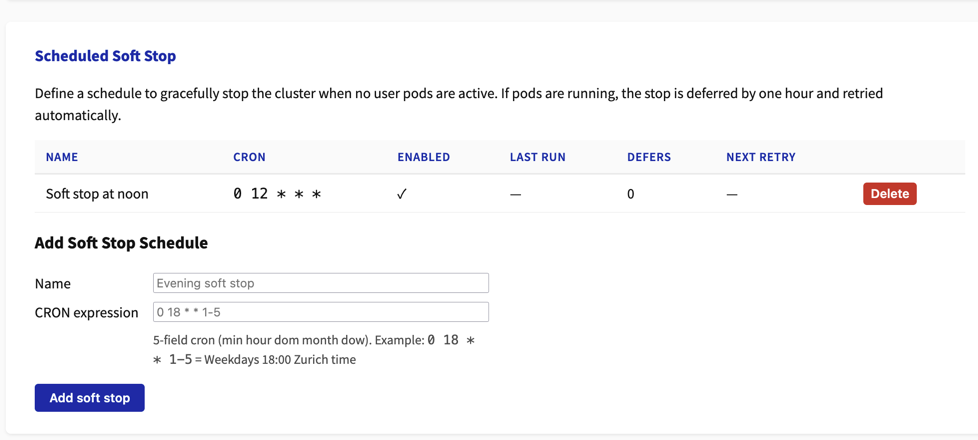
You can help with optimizing costs by scheduling a time (or multiple times) for soft shut-downs (see image below).
Starting at the scheduled CRON time, the cluster is shut down, provided that no workload (jupyter-server) was active during the last half hour. If it was busy a retry is scheduled in an hour.